> ## Documentation Index
> Fetch the complete documentation index at: https://getsoda.app/docs/llms.txt
> Use this file to discover all available pages before exploring further.
# Set up Soda for your team
> Bringing your team into Soda.
Your calls, emails, notes, and customer profiles are your own. Bringing your team into Soda doesn't change that. Being in the same workspace shares nothing by itself, and admins can't see your memory either, unless you share it with them. You choose what your teammates see.
## Why share with your team
Customers rarely deal with one person. A prospect might talk to a BDR first, then an AE, then customer success once they sign. When each person starts from scratch, it feels disjointed to the customer. They repeat themselves, and context gets lost along the way.
Say Geoff at Acme has spent three months talking to your AE about their rollout. The deal closes, and Acme moves over to customer success. Your AE shares Geoff's profile with the customer success manager, who walks into their first call already knowing the story: who's involved, what Geoff cares about, and what was agreed. Geoff doesn't have to explain it all again.
That's how your team works from one picture of each customer. A share arrives in your teammate's **Inbox**. See [how to share with a teammate](/docs/using-soda/share).
## Set up your team
In **Settings** > **Workspace** > **General**, check that your company's email domain is under **Allowed Domains**. See [how Workspaces work](/docs/account/workspaces).
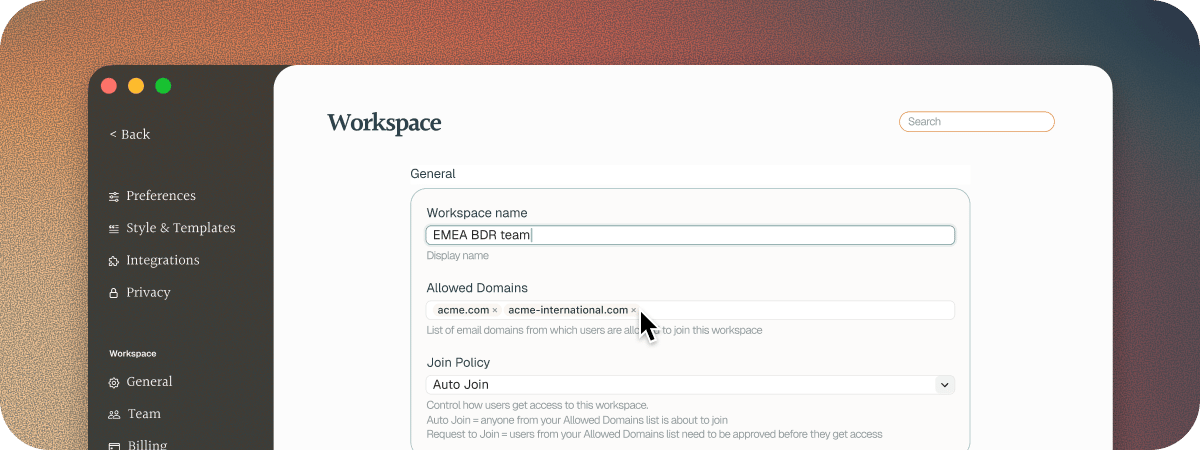 Go to **Settings** > **Workspace** > **Team** and click **Invite Teammate**. Add their email addresses, or pick from the people Soda suggests. Then click **Invite**, and each of them gets an email to join. See [Workspaces](/docs/account/workspaces).
## Next steps
Share a customer, so whoever picks them up already knows the story.
Ask Soda about any customer, including the ones your teammates share with you.
This documentation is built and hosted on [Mintlify](https://mintlify.com), a developer documentation platform.
Go to **Settings** > **Workspace** > **Team** and click **Invite Teammate**. Add their email addresses, or pick from the people Soda suggests. Then click **Invite**, and each of them gets an email to join. See [Workspaces](/docs/account/workspaces).
## Next steps
Share a customer, so whoever picks them up already knows the story.
Ask Soda about any customer, including the ones your teammates share with you.
This documentation is built and hosted on [Mintlify](https://mintlify.com), a developer documentation platform.