> ## Documentation Index
> Fetch the complete documentation index at: https://getsoda.app/docs/llms.txt
> Use this file to discover all available pages before exploring further.
# Draft your first follow-up email
> Follow-up emails that actually sound like you (not ai slop)
The call went well. You agreed the next steps and promised to send them over. Then the next meeting started, and the one after that. Now the day's nearly over, the follow-up still isn't written, and the details are starting to blur.
Don't worry, Soda writes that follow-up for you, from what was actually said on the call. It's written in your own voice, so it reads like you wrote it yourself. You look it over, and send it when you're ready.
## Written in your voice
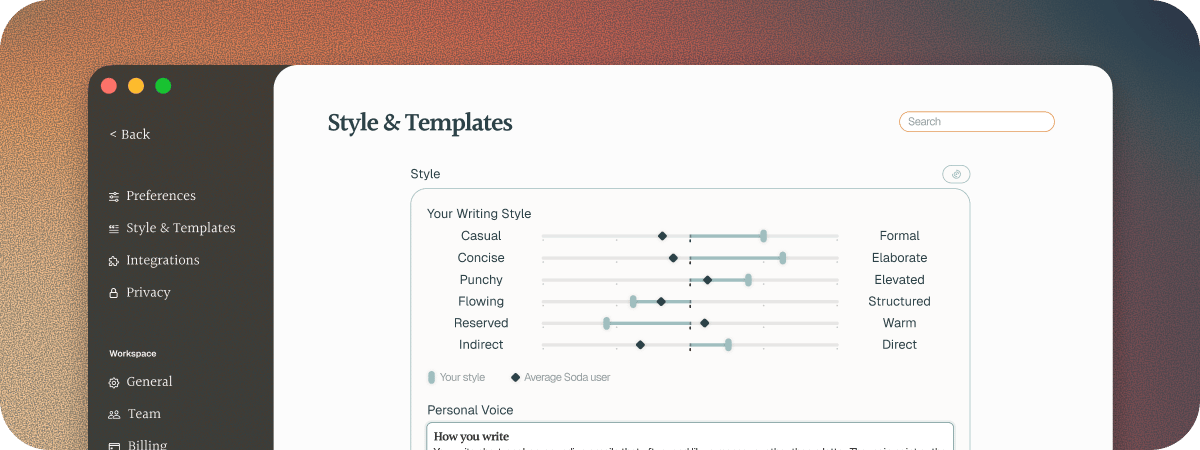
Your customers know how you write, so a generic email stands out. That's why Soda learns your style. When you connect your email, Soda reads what you've written in the past and builds your Voice Profile. It picks up things like:
* How you structure sentences
* The style language you use
* How you format an email
* Your usual greetings and sign-offs
* And much more
It even notices that you write differently for different people. An email to someone you're contacting for the first time sounds different from one to a customer you've known for years, a colleague, or a whole group. Soda learns each of those, so your drafts suit the people they're for.
Soda builds your Voice Profile by itself. You'll see it working away when you first connect your email account.
 ## Draft a follow-up
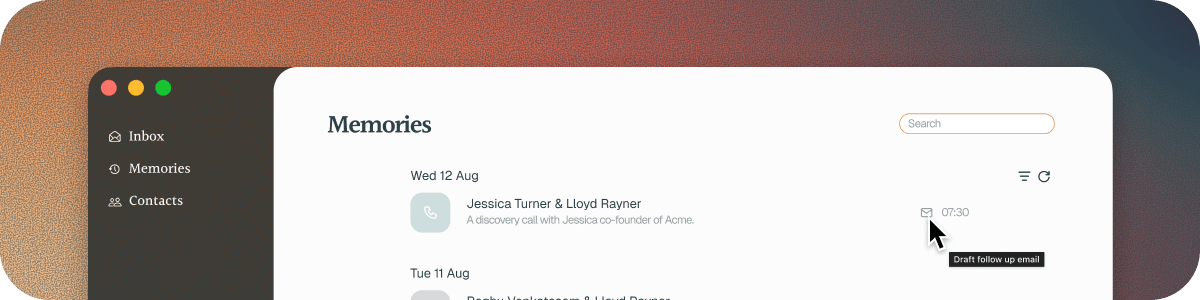
In **Memories**, click the envelope icon on the call, **Draft follow up email**. Or open the call's notepad and choose **Send follow-up email** from its menu.
Soda writes the email based on the call: what you agreed, and who's doing what next. It takes a moment, because it's written properly from the whole conversation.
## Draft a follow-up
In **Memories**, click the envelope icon on the call, **Draft follow up email**. Or open the call's notepad and choose **Send follow-up email** from its menu.
Soda writes the email based on the call: what you agreed, and who's doing what next. It takes a moment, because it's written properly from the whole conversation.
 Want a different feel? Change the **Style** or the **Template**, and Soda rewrites the draft to match.
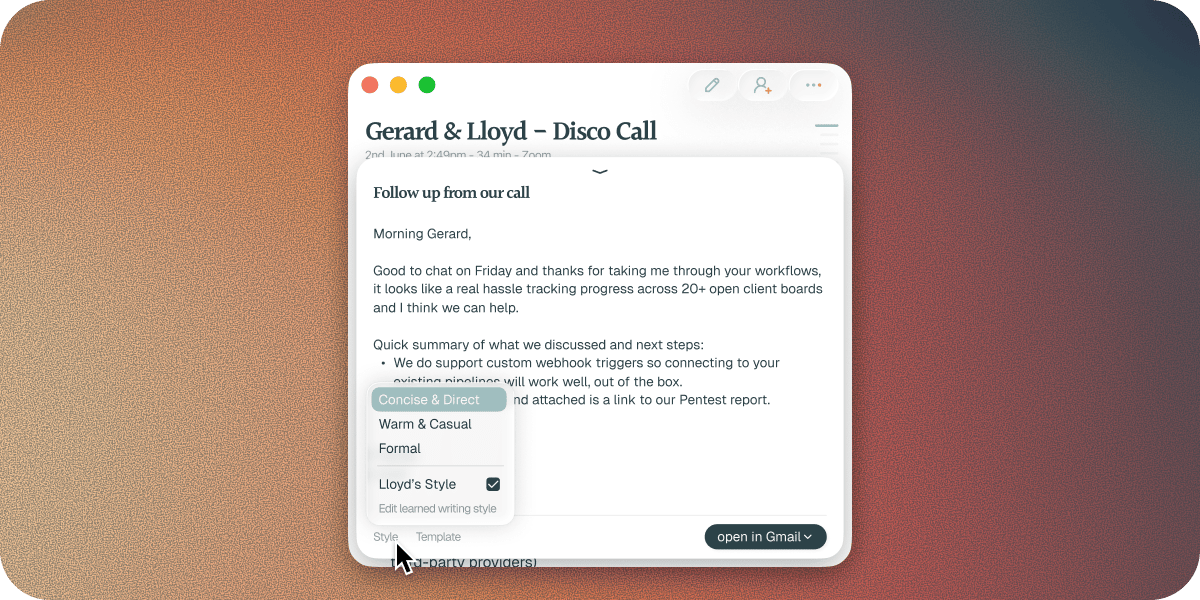 Click **open in Gmail** or **open in Outlook**. Soda saves the email as a real draft in your mailbox, addressed to the people on the call, and opens it for you.
Change anything you like, then send it when you're ready.
## Templates
A template decides what the email covers. Soda comes with five: **Next Steps**, **Meeting Recap**, **Demo Follow Up**, **Thank You**, and **1:1**. You can add your own too, for the emails you find yourself writing again and again.
## Update your voice
Your Voice Profile lives in **Settings** > **Style & Templates**. There you can describe your voice in your own words, rebuild your Voice Profile, and manage your templates. See [your Voice Profile](/docs/using-soda/voice-profile) and [follow-up emails](/docs/using-soda/follow-up-emails).
## You always send it yourself
Soda never sends an email for you. Every draft waits in your mailbox until you're ready to send it. Because nothing goes out without you, the draft can be specific, with real names and real next steps.
Soda uses the call to know what to write, and your sent emails to learn how you write it. See [what Soda captures, and what it never does](/docs/privacy/what-soda-captures).
## Questions
Soda needs at least 20 sent emails to learn your style. If it couldn't finish, **Settings** > **Style & Templates** shows what went wrong, with a button to try again.
Go to **Settings** > **Style & Templates** and click **Connect inbox**. See [how to connect Gmail or Outlook](/docs/integrations/gmail-and-outlook).
If you see "Couldn't draft: nobody on this call has been linked yet", Soda doesn't know who was on the call yet, so there's nobody to write to. This usually means the call is still being processed, or you were the only person on it. Wait until the call has finished processing in **Memories**, then try again.
Soda addresses the draft to everyone it knows was on the call. If it doesn't have someone's email address, add it before you send.
Try another **Style**. To change your voice for every draft, edit it in **Settings** > **Style & Templates**.
## Next steps
Fine-tune your voice, styles, and templates.
Bring your teammates in, so you all contribute to the same shared memory.
This documentation is built and hosted on [Mintlify](https://mintlify.com), a developer documentation platform.
Click **open in Gmail** or **open in Outlook**. Soda saves the email as a real draft in your mailbox, addressed to the people on the call, and opens it for you.
Change anything you like, then send it when you're ready.
## Templates
A template decides what the email covers. Soda comes with five: **Next Steps**, **Meeting Recap**, **Demo Follow Up**, **Thank You**, and **1:1**. You can add your own too, for the emails you find yourself writing again and again.
## Update your voice
Your Voice Profile lives in **Settings** > **Style & Templates**. There you can describe your voice in your own words, rebuild your Voice Profile, and manage your templates. See [your Voice Profile](/docs/using-soda/voice-profile) and [follow-up emails](/docs/using-soda/follow-up-emails).
## You always send it yourself
Soda never sends an email for you. Every draft waits in your mailbox until you're ready to send it. Because nothing goes out without you, the draft can be specific, with real names and real next steps.
Soda uses the call to know what to write, and your sent emails to learn how you write it. See [what Soda captures, and what it never does](/docs/privacy/what-soda-captures).
## Questions
Soda needs at least 20 sent emails to learn your style. If it couldn't finish, **Settings** > **Style & Templates** shows what went wrong, with a button to try again.
Go to **Settings** > **Style & Templates** and click **Connect inbox**. See [how to connect Gmail or Outlook](/docs/integrations/gmail-and-outlook).
If you see "Couldn't draft: nobody on this call has been linked yet", Soda doesn't know who was on the call yet, so there's nobody to write to. This usually means the call is still being processed, or you were the only person on it. Wait until the call has finished processing in **Memories**, then try again.
Soda addresses the draft to everyone it knows was on the call. If it doesn't have someone's email address, add it before you send.
Try another **Style**. To change your voice for every draft, edit it in **Settings** > **Style & Templates**.
## Next steps
Fine-tune your voice, styles, and templates.
Bring your teammates in, so you all contribute to the same shared memory.
This documentation is built and hosted on [Mintlify](https://mintlify.com), a developer documentation platform.