> ## Documentation Index
> Fetch the complete documentation index at: https://getsoda.app/docs/llms.txt
> Use this file to discover all available pages before exploring further.
# Connect Gmail or Outlook
> Let Soda learn from your email.
Connect your mailbox, and Soda [learns from your email conversations](/docs/memory/how-memory-works) as well as your calls. It also [drafts follow-ups](/docs/getting-started/your-first-follow-up) in your voice and saves them to your mailbox. Soda never sends an email for you.
## Connect your mailbox
Go to **Settings** > **Integrations**.
Click **Connect** next to **Gmail** or **Outlook**. Your browser opens.
Choose your account and allow what Soda asks for. When your browser says you're connected, close the tab.
Your company may need to approve email access separately, even if Soda is already approved for sign-in. If Soda says your organisation's admin may need to approve email access, see [If your company needs to approve Soda](/docs/getting-started/install-and-sign-in#if-your-company-needs-to-approve-soda).
The first mailbox you connect starts two things by itself:
* Soda catches up on your last 30 days of email, up to 600 conversations. You'll see **Backfilling memory** while it works.
* Soda builds your [Voice Profile](/docs/using-soda/voice-profile).
A mailbox you add later is kept in sync from the moment you connect it.
## What Soda reads
Soda reads your conversations with people. It skips newsletters, marketing, automated notifications, no-reply senders, and calendar invites. It also skips anyone you've [excluded](/docs/memory/exclude-people-and-domains). It doesn't read attachments.
Only you can see what Soda learns from your email, unless you [share it](/docs/using-soda/share).
## Stop Soda reading new email
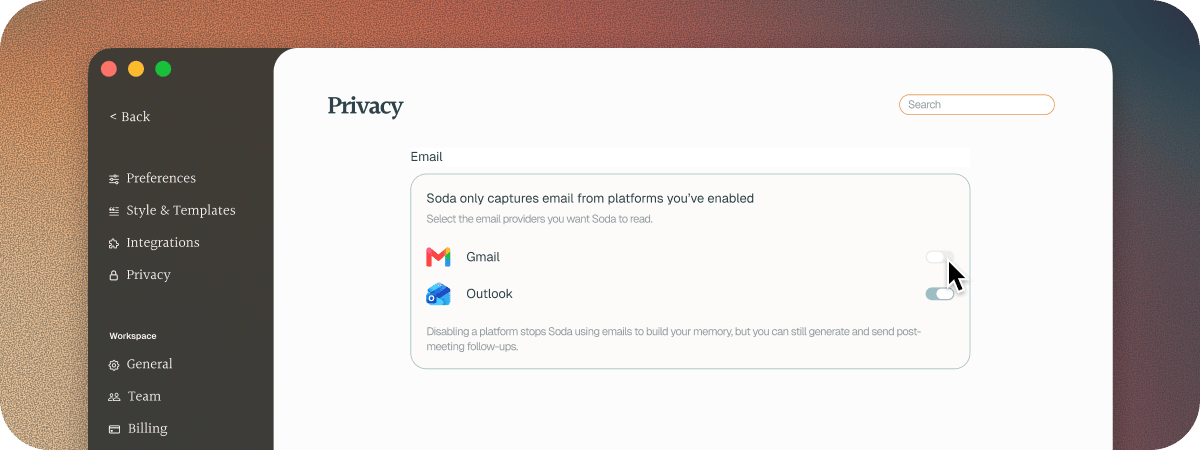
Go to **Settings** > **Privacy** and turn off **Gmail** or **Outlook**. Soda stops learning from new email in that mailbox. What it has already learned stays, and follow-ups still work. Turn it back on at any time.
 ## Disconnect, and what happens to your data
In **Settings** > **Integrations**, click **⋯** on the mailbox's row.
Soda asks you to confirm: "Soda will stop reading this mailbox. Memories already captured from it stay."
Soda loses access to that mailbox.
Soda deletes the email text it stored from that mailbox, usually within a day. Your memories, the details Soda learned, your Voice Profile, and your drafts stay. To delete memories too, see [delete your data](/docs/memory/delete-your-data).
You can also remove Soda's access in your Google or Microsoft account. The mailbox then shows **Reconnect needed** in Soda.
## Troubleshooting
Yes. Connect your mailbox, then turn off **Gmail** or **Outlook** in **Settings** > **Privacy**. Soda stops turning your email into memories. It still drafts your follow-ups after calls, in your voice, and saves them to your mailbox.
To keep your past email out too, turn the switch off before you connect.
You'll see a message like "Couldn't connect Gmail. Please try again or contact support." Click **Connect** again and finish the steps in your browser. If it keeps failing, [contact support](/docs/troubleshooting/contact-support).
In **Settings** > **Integrations**, check the mailbox for **Reconnect needed**. If it's there, click **⋯**, then choose **Reconnect**. Then check its switch is on in **Settings** > **Privacy**.
Only the first mailbox you connect catches up on the last 30 days. Any mailbox after that is kept in sync from the moment you connect it.
## Next steps
How Soda learns to write like you.
Keep someone out of your memory.
This documentation is built and hosted on [Mintlify](https://mintlify.com), a developer documentation platform.
## Disconnect, and what happens to your data
In **Settings** > **Integrations**, click **⋯** on the mailbox's row.
Soda asks you to confirm: "Soda will stop reading this mailbox. Memories already captured from it stay."
Soda loses access to that mailbox.
Soda deletes the email text it stored from that mailbox, usually within a day. Your memories, the details Soda learned, your Voice Profile, and your drafts stay. To delete memories too, see [delete your data](/docs/memory/delete-your-data).
You can also remove Soda's access in your Google or Microsoft account. The mailbox then shows **Reconnect needed** in Soda.
## Troubleshooting
Yes. Connect your mailbox, then turn off **Gmail** or **Outlook** in **Settings** > **Privacy**. Soda stops turning your email into memories. It still drafts your follow-ups after calls, in your voice, and saves them to your mailbox.
To keep your past email out too, turn the switch off before you connect.
You'll see a message like "Couldn't connect Gmail. Please try again or contact support." Click **Connect** again and finish the steps in your browser. If it keeps failing, [contact support](/docs/troubleshooting/contact-support).
In **Settings** > **Integrations**, check the mailbox for **Reconnect needed**. If it's there, click **⋯**, then choose **Reconnect**. Then check its switch is on in **Settings** > **Privacy**.
Only the first mailbox you connect catches up on the last 30 days. Any mailbox after that is kept in sync from the moment you connect it.
## Next steps
How Soda learns to write like you.
Keep someone out of your memory.
This documentation is built and hosted on [Mintlify](https://mintlify.com), a developer documentation platform.