> ## Documentation Index
> Fetch the complete documentation index at: https://getsoda.app/docs/llms.txt
> Use this file to discover all available pages before exploring further.
# AI Enhanced Meeting Notes
> Helping you stay present and in the conversation.
Halfway through a call, Anna says Northwind wants to move to annual billing, and asks whether that comes with a discount. It matters. Do you look down and type it all out, or keep listening and hope you remember?
With the AI Notepad, you don't have to choose. It's a notepad that listens alongside you. Jot "pricing, wants annual", look back up, and stay in the conversation. When the call ends, Soda turns what you wrote, and everything else that was discussed, into one clear write-up.
We built Soda to work brilliantly on autopilot (*admin is tedious enough, and this shouldn't feel like homework*). But AI-enhanced meeting notes are there if you like being hands-on and having full control over your notes.
## Your notes steer the summary
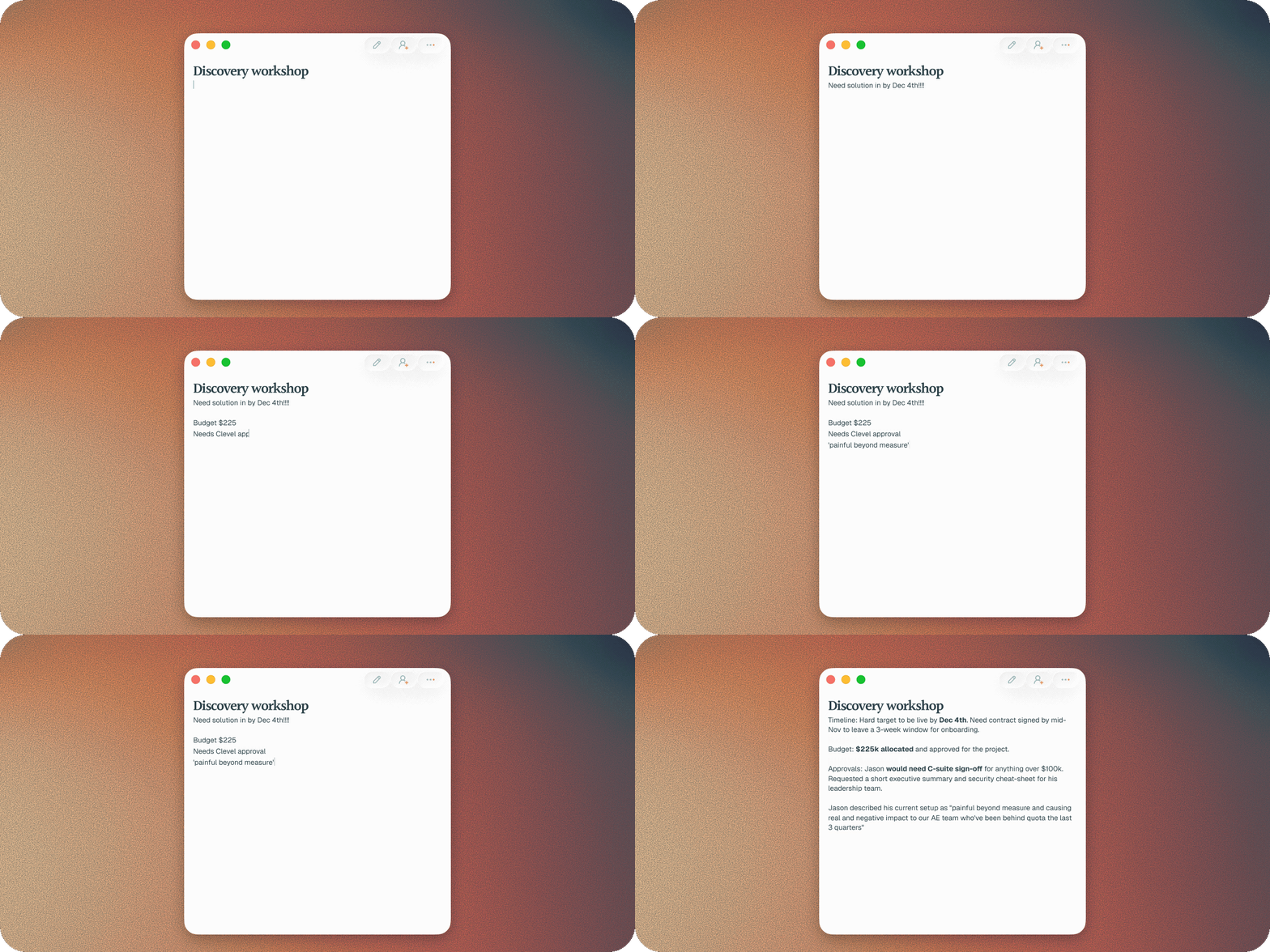
Write nothing, and you still get a full write-up of the call. Write down "pricing", and Soda goes deep on pricing: what Bruce asked, what you said, and what's still open. Note down a few focused points, and you get a write-up focused on those points.
Soda already picks up on what matters in a conversation. Your notes tell it what matters to you.
 ## Capture it your way
Sometimes something has to be captured a certain way: the exact terminology Bruce used, or how a decision was worded. Note it down. Every point you note makes it into the write-up, and Soda builds the detail around it.
## How Soda understands your shorthand
Soda looks at when you wrote each note, not just what you wrote. That matters, because "pricing" might come up four times on a call, and a note like "quote about pricing" could mean any of them.
When Soda writes up your notes, it follows the conversation around the moment you typed, using that to understand and build the right context. That's how three words become the right point.
## An example
Here's a call with Bruce at Northwind. On the left is everything you typed. On the right is the **Summary** Soda wrote. Your words are in the normal colour, and Soda's are lighter, just as they are in your notepad.
Before the call: renewal, check seat count
pricing, wants annual
security review, Anna?
Ahead of the renewal, we went through the seat count with Bruce. Northwind now needs 140 seats, up from 110. Bruce wants to move to annual billing and asked whether it comes with a discount. That hasn't been confirmed yet. Northwind needs a security review before signing. Anna from their IT team will run it, and Bruce will send over her details.
Alongside the **Summary**, Soda writes up the **Action Items**, **Decisions**, and **Key Moments**. Change anything Soda wrote and it becomes yours, and your edit stays.
## Take notes on your next call
Join the call from **Upcoming meetings** with **Join with Notepad**, and a notepad opens with the meeting, ready to type in. Or open a note a few minutes before the call and click **Attach** when Soda asks. See [join a call with a notepad](/docs/using-soda/notepad#join-a-call-with-a-notepad).
## What happens to the audio
Soda never keeps the audio. It's heard on your Mac, then discarded. See [what Soda captures, and what it never does](/docs/privacy/what-soda-captures).
## Troubleshooting
You still get a full write-up. Soda writes up every call, notes or not. Open the call in **Memories** afterwards to add anything you want to remember.
Add it yourself in the call's notepad. Your edit stays. Then [let us know](/docs/troubleshooting/contact-support), so we can look at why it was missed.
Soda is still working through the call, and longer calls take longer. If the call shows **Failed** in **Memories**, Soda couldn't finish the write-up. [Contact support](/docs/troubleshooting/contact-support) and tell us which call it was.
## Next steps
Open, format, pin, and share a notepad, and add components.
What to do when a write-up or a profile needs fixing.
This documentation is built and hosted on [Mintlify](https://mintlify.com), a developer documentation platform.
## Capture it your way
Sometimes something has to be captured a certain way: the exact terminology Bruce used, or how a decision was worded. Note it down. Every point you note makes it into the write-up, and Soda builds the detail around it.
## How Soda understands your shorthand
Soda looks at when you wrote each note, not just what you wrote. That matters, because "pricing" might come up four times on a call, and a note like "quote about pricing" could mean any of them.
When Soda writes up your notes, it follows the conversation around the moment you typed, using that to understand and build the right context. That's how three words become the right point.
## An example
Here's a call with Bruce at Northwind. On the left is everything you typed. On the right is the **Summary** Soda wrote. Your words are in the normal colour, and Soda's are lighter, just as they are in your notepad.
Before the call: renewal, check seat count
pricing, wants annual
security review, Anna?
Ahead of the renewal, we went through the seat count with Bruce. Northwind now needs 140 seats, up from 110. Bruce wants to move to annual billing and asked whether it comes with a discount. That hasn't been confirmed yet. Northwind needs a security review before signing. Anna from their IT team will run it, and Bruce will send over her details.
Alongside the **Summary**, Soda writes up the **Action Items**, **Decisions**, and **Key Moments**. Change anything Soda wrote and it becomes yours, and your edit stays.
## Take notes on your next call
Join the call from **Upcoming meetings** with **Join with Notepad**, and a notepad opens with the meeting, ready to type in. Or open a note a few minutes before the call and click **Attach** when Soda asks. See [join a call with a notepad](/docs/using-soda/notepad#join-a-call-with-a-notepad).
## What happens to the audio
Soda never keeps the audio. It's heard on your Mac, then discarded. See [what Soda captures, and what it never does](/docs/privacy/what-soda-captures).
## Troubleshooting
You still get a full write-up. Soda writes up every call, notes or not. Open the call in **Memories** afterwards to add anything you want to remember.
Add it yourself in the call's notepad. Your edit stays. Then [let us know](/docs/troubleshooting/contact-support), so we can look at why it was missed.
Soda is still working through the call, and longer calls take longer. If the call shows **Failed** in **Memories**, Soda couldn't finish the write-up. [Contact support](/docs/troubleshooting/contact-support) and tell us which call it was.
## Next steps
Open, format, pin, and share a notepad, and add components.
What to do when a write-up or a profile needs fixing.
This documentation is built and hosted on [Mintlify](https://mintlify.com), a developer documentation platform.