> ## Documentation Index
> Fetch the complete documentation index at: https://getsoda.app/docs/llms.txt
> Use this file to discover all available pages before exploring further.
# Post meeting summary email
> Styles, templates, and writing emails.
Soda writes your follow-ups the way you would, down to the small habits you don't know you have. That's your Voice Profile, and it has [a page of its own](/docs/using-soda/voice-profile). This page covers the rest: choosing a style, templates, and what goes in every draft. New to follow-ups? Start with [Draft your first follow-up email](/docs/getting-started/your-first-follow-up).
And Soda never sends emails from you automatically. Every email stays in your drafts folder until you press 'send'.
## Choose a style for each draft
When a draft is open, click **Style** to choose how it sounds. Soda rewrites the draft to match.
* The style with your name on it, like **Anna's Style**, is your own voice. It uses your Voice Profile.
* **Concise & Direct**, **Warm & Casual**, and **Formal** are fixed styles. They set your voice aside for that one draft. Handy when you want something different from your usual, like a formal note to a customer's legal team.
* **Edit learned writing style** opens **Settings** > **Style & Templates**.
 ## Templates
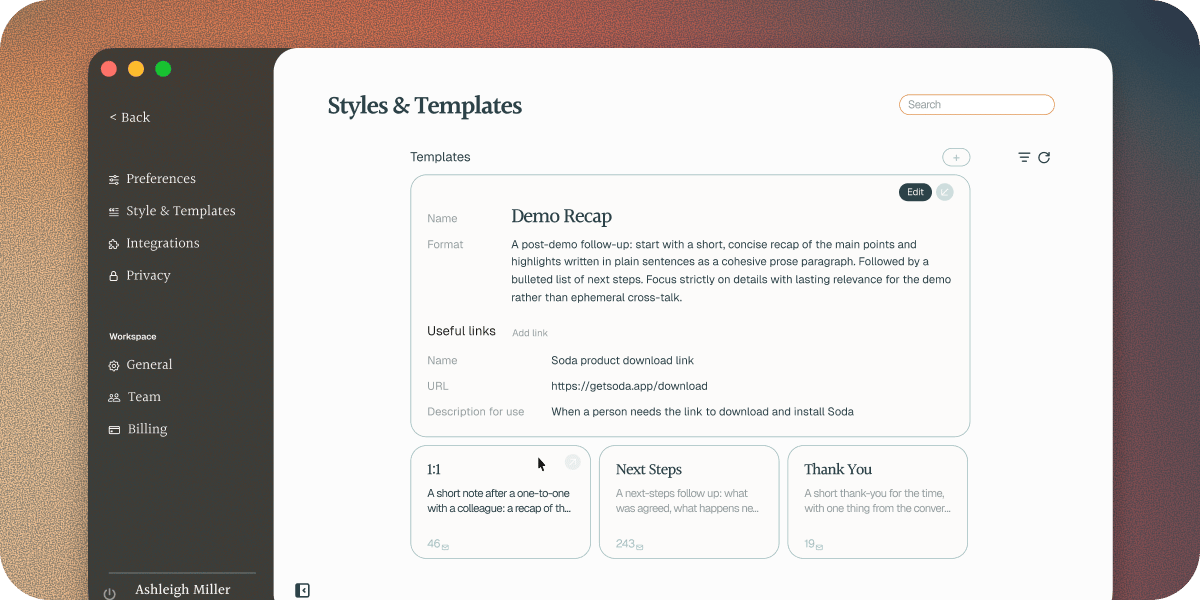
Your style decides how a follow-up sounds. A template decides what it covers and it's structure. Soda comes with five:
* **Next Steps** lists what was agreed, what happens next, and who's doing what.
* **Meeting Recap** is a fuller write-up of what you discussed and decided.
* **Demo Follow Up** recaps the highlights of a demo, then lists the next steps.
* **Thank You** is a short thank-you for the one thing that mattered most, with one next step at most.
* **1:1** is for a catch-up with a colleague: blockers, issues, next steps, and who owes whom what.
### Make your own template
Have an email you write again and again, like a renewal check-in or a welcome for a new customer? Make it a template.
In **Settings** > **Style & Templates**, click **+** next to **Templates**.
Type a **Name**, like "Renewal check-in".
In **Format**, describe what the email should cover, the way you'd brief a colleague. For example: "Thank them, restate what we agreed, get them set up, and make it clear how to reach me."
Add any **Useful links** you want Soda to have on hand. See the next section.
Click **Save**.
Your templates are yours, and teammates don't see them. You can edit or delete them in **Style & Templates** at any time.
### Add useful links
Add frequently used links directly into the template for Soda to use (i.e. your calendar booking link, pricing page, or onboarding docs). Give each one a **Name**, its **URL**, and a **Description for use** that says when it's needed, like "For people to book meetings in my calendar".
Soda only adds a link when the conversation calls for it. Sally asks for time with your team next week? Your booking link is in the draft.
## Troubleshooting
Tell Soda what's off in **Personal Voice**, in your own words, or rebuild your Voice Profile. See [shape it in your own words](/docs/using-soda/voice-profile#editing-your-voice-profile). For a single draft, you can also try one of the fixed styles.
Pick a different **Style** or **Template**. **Concise & Direct** and **Thank You** keep things short. **Meeting Recap** gives you more. To change the length of every draft, say how long you like your emails in [**Personal Voice**](/docs/using-soda/voice-profile#editing-your-voice-profile).
Soda addresses each draft to the people it knows were on the call. Open the call in **Memories** to check who's listed. You can also add or remove people in Gmail or Outlook before you send.
Soda writes the draft from the call's write-up. If a detail isn't in the write-up, it can't go in the email. Add it to the draft before you send, and to the call's notepad so it's in your memory too.
## Next steps
How Soda learns to write like you, and how to shape it.
Ask Soda for a draft, and open it in Gmail or Outlook.
Connect your mailbox, and see what Soda reads.
What Soda reads and keeps, and what it never does.
This documentation is built and hosted on [Mintlify](https://mintlify.com), a developer documentation platform.
## Templates
Your style decides how a follow-up sounds. A template decides what it covers and it's structure. Soda comes with five:
* **Next Steps** lists what was agreed, what happens next, and who's doing what.
* **Meeting Recap** is a fuller write-up of what you discussed and decided.
* **Demo Follow Up** recaps the highlights of a demo, then lists the next steps.
* **Thank You** is a short thank-you for the one thing that mattered most, with one next step at most.
* **1:1** is for a catch-up with a colleague: blockers, issues, next steps, and who owes whom what.
### Make your own template
Have an email you write again and again, like a renewal check-in or a welcome for a new customer? Make it a template.
In **Settings** > **Style & Templates**, click **+** next to **Templates**.
Type a **Name**, like "Renewal check-in".
In **Format**, describe what the email should cover, the way you'd brief a colleague. For example: "Thank them, restate what we agreed, get them set up, and make it clear how to reach me."
Add any **Useful links** you want Soda to have on hand. See the next section.
Click **Save**.
Your templates are yours, and teammates don't see them. You can edit or delete them in **Style & Templates** at any time.
### Add useful links
Add frequently used links directly into the template for Soda to use (i.e. your calendar booking link, pricing page, or onboarding docs). Give each one a **Name**, its **URL**, and a **Description for use** that says when it's needed, like "For people to book meetings in my calendar".
Soda only adds a link when the conversation calls for it. Sally asks for time with your team next week? Your booking link is in the draft.
## Troubleshooting
Tell Soda what's off in **Personal Voice**, in your own words, or rebuild your Voice Profile. See [shape it in your own words](/docs/using-soda/voice-profile#editing-your-voice-profile). For a single draft, you can also try one of the fixed styles.
Pick a different **Style** or **Template**. **Concise & Direct** and **Thank You** keep things short. **Meeting Recap** gives you more. To change the length of every draft, say how long you like your emails in [**Personal Voice**](/docs/using-soda/voice-profile#editing-your-voice-profile).
Soda addresses each draft to the people it knows were on the call. Open the call in **Memories** to check who's listed. You can also add or remove people in Gmail or Outlook before you send.
Soda writes the draft from the call's write-up. If a detail isn't in the write-up, it can't go in the email. Add it to the draft before you send, and to the call's notepad so it's in your memory too.
## Next steps
How Soda learns to write like you, and how to shape it.
Ask Soda for a draft, and open it in Gmail or Outlook.
Connect your mailbox, and see what Soda reads.
What Soda reads and keeps, and what it never does.
This documentation is built and hosted on [Mintlify](https://mintlify.com), a developer documentation platform.