> ## Documentation Index
> Fetch the complete documentation index at: https://getsoda.app/docs/llms.txt
> Use this file to discover all available pages before exploring further.
# Inbox
> Where things that need you arrive.
Most of what Soda does needs nothing from you. The **Inbox** is for the few things that do. A teammate shares a customer with you. A call was so short that Soda wants to check before keeping it.
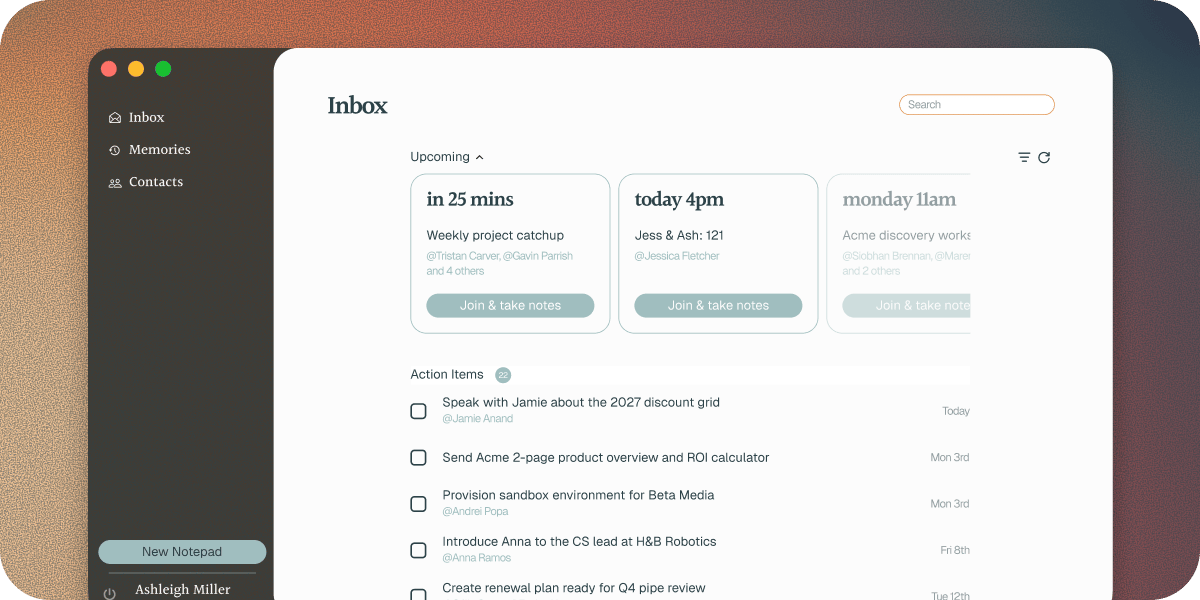
Click **Inbox** in the Soda window's sidebar to open it. It also shows your next meetings and every action item that's still open, so it's a good place to start the day.
 ## Your next meetings
**Upcoming** shows the meetings coming up on your calendar, and who's in each one. Click the name of someone Soda knows to open their profile before you join. When it's time, click **Join** to go straight into the meeting. To have a notepad open alongside the meeting, see [upcoming meetings and quick join](/docs/calls/upcoming-meetings).
## Things waiting for you
The **Inbox** section holds anything that needs a decision from you. When there's nothing, it says **Nothing pending**.
### A teammate shared something
When a teammate shares a contact, company, or call with you, it arrives here. The line under its name says what it is and who sent it, like "Company shared by Anna". A shared call or note says "Note shared by Anna".
Nothing is added to your memory until you accept it. Click **Accept** to add it, or **Decline** to turn it down.
### A short call
Some calls are over almost as soon as they start: a wrong link, a sound check, a call that drops. Soda asks before it keeps one. You'll see something like "Short call on Zoom" and "Keep this 2-minute call?". Click **Save** to keep it and get a write-up, or **Ignore** to let it go.
You choose how short counts as short, and whether Soda asks at all, in **Settings** > **Preferences**. See [Preferences](/docs/account/preferences) and [short calls](/docs/calls/short-calls-and-language).
### Someone wants to join your workspace
If you're a workspace admin, requests to join show here, with the person's name and "Wants to join Halden". Click **Approve** to let them in, or **Decline**. See [Set up your team](/docs/getting-started/set-up-your-team).
## Action Items
**Action Items** lists every open action item, the soonest due first. Tick one off when it's done. The number next to the heading is how many are still open.
## Troubleshooting
Check which email address your teammate shared it with. It needs to be the one you use for Soda. A share you don't accept within 30 days expires. If it has, ask them to share it again.
Nothing needs you right now. Shares, short calls, questions from Soda, and join requests appear here as they arrive.
## Next steps
Give a teammate the full story on a customer.
Join your next meeting from Soda, with a notepad ready if you want one.
This documentation is built and hosted on [Mintlify](https://mintlify.com), a developer documentation platform.
## Your next meetings
**Upcoming** shows the meetings coming up on your calendar, and who's in each one. Click the name of someone Soda knows to open their profile before you join. When it's time, click **Join** to go straight into the meeting. To have a notepad open alongside the meeting, see [upcoming meetings and quick join](/docs/calls/upcoming-meetings).
## Things waiting for you
The **Inbox** section holds anything that needs a decision from you. When there's nothing, it says **Nothing pending**.
### A teammate shared something
When a teammate shares a contact, company, or call with you, it arrives here. The line under its name says what it is and who sent it, like "Company shared by Anna". A shared call or note says "Note shared by Anna".
Nothing is added to your memory until you accept it. Click **Accept** to add it, or **Decline** to turn it down.
### A short call
Some calls are over almost as soon as they start: a wrong link, a sound check, a call that drops. Soda asks before it keeps one. You'll see something like "Short call on Zoom" and "Keep this 2-minute call?". Click **Save** to keep it and get a write-up, or **Ignore** to let it go.
You choose how short counts as short, and whether Soda asks at all, in **Settings** > **Preferences**. See [Preferences](/docs/account/preferences) and [short calls](/docs/calls/short-calls-and-language).
### Someone wants to join your workspace
If you're a workspace admin, requests to join show here, with the person's name and "Wants to join Halden". Click **Approve** to let them in, or **Decline**. See [Set up your team](/docs/getting-started/set-up-your-team).
## Action Items
**Action Items** lists every open action item, the soonest due first. Tick one off when it's done. The number next to the heading is how many are still open.
## Troubleshooting
Check which email address your teammate shared it with. It needs to be the one you use for Soda. A share you don't accept within 30 days expires. If it has, ask them to share it again.
Nothing needs you right now. Shares, short calls, questions from Soda, and join requests appear here as they arrive.
## Next steps
Give a teammate the full story on a customer.
Join your next meeting from Soda, with a notepad ready if you want one.
This documentation is built and hosted on [Mintlify](https://mintlify.com), a developer documentation platform.