> ## Documentation Index
> Fetch the complete documentation index at: https://getsoda.app/docs/llms.txt
> Use this file to discover all available pages before exploring further.
# Your Voice Profile
> How Soda learns to write like you.
This is pretty magical and we hope you like it as much as we do.
The Soda team
Nothing kills a relationship faster than AI slop. A generic follow-up stands out, and not in a good way. So before Soda drafts a single email for you, it learns how you write. It analyses the emails you've sent and builds a fingerprint of your linguistic style, down to the small habits you don't know you have. That's your Voice Profile, and it's why a Soda draft reads like you wrote it yourself.
## How Soda learns your voice
Soda studies your previous emails you've sent the way a linguist would to build a personal voice profile. It keeps a small sample of them as examples of your style. They're private to you, and they go when you delete your account.
Small choices say a lot about a writer. "Just wondering if Tuesday might work?" and "Let's do Tuesday" ask for the same thing, but they read like two different people. Soda pays attention at that level. It notices how long your sentences run and how much you pack into each one, whether you'd write "use" or "utilise", whether your ask comes first or after the context. It even learns your work shorthand, the abbreviations and names that keep coming up.
Soda counts your habits email by email: how often you open with a thank-you, sign off with "Cheers", or break things into bullet points. It keeps track of what's missing, too. If you never open an email with "Dear", Soda notes that too.
All of this becomes your **Personal Voice**, a style guide to your writing in plain English. Soda follows it whenever it writes as you, and you can [read it and change it](#editing-your-voice-profile).
## It adapts to who you're writing to
Nobody writes the same way to everyone. You're more careful in a first email to someone new, and more relaxed with a colleague. A note to a whole group looks different again.
So Soda compares how you write in four settings: first emails to someone new, emails to customers and anyone else outside your company, emails to colleagues, and group emails. For each one, it notes what changes, like your greeting, your sign-off, how long you write, and how much you soften an ask.
When Soda drafts a follow-up, it works out who the email is going to and writes the way you would for them. There's nothing to pick, it's automatic.
## Building your Voice Profile
Soda builds your Voice Profile by itself when you first connect your mailbox. A notification shows **Building Voice Profile** while Soda works through to build your profile.
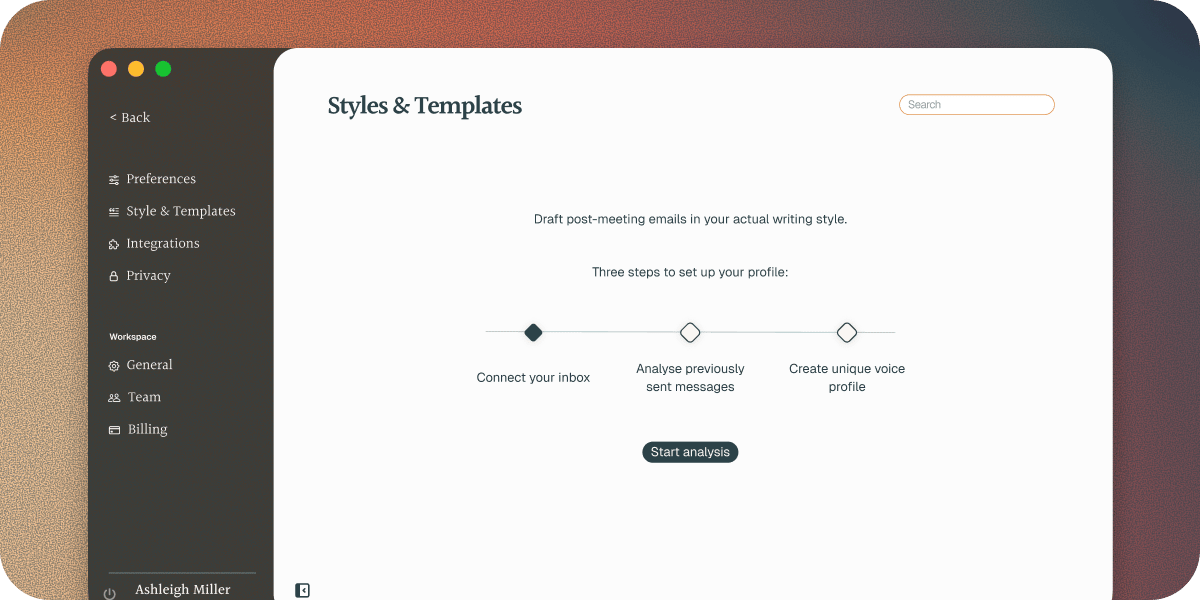
If you didn't connect your email during setup, go to **Settings** > **Style & Templates**. You'll see three steps: connect your inbox, analyse your sent messages, and create your Voice Profile. Click **Connect inbox**, or **Start analysis** if your email is already connected.
 ## See your writing style
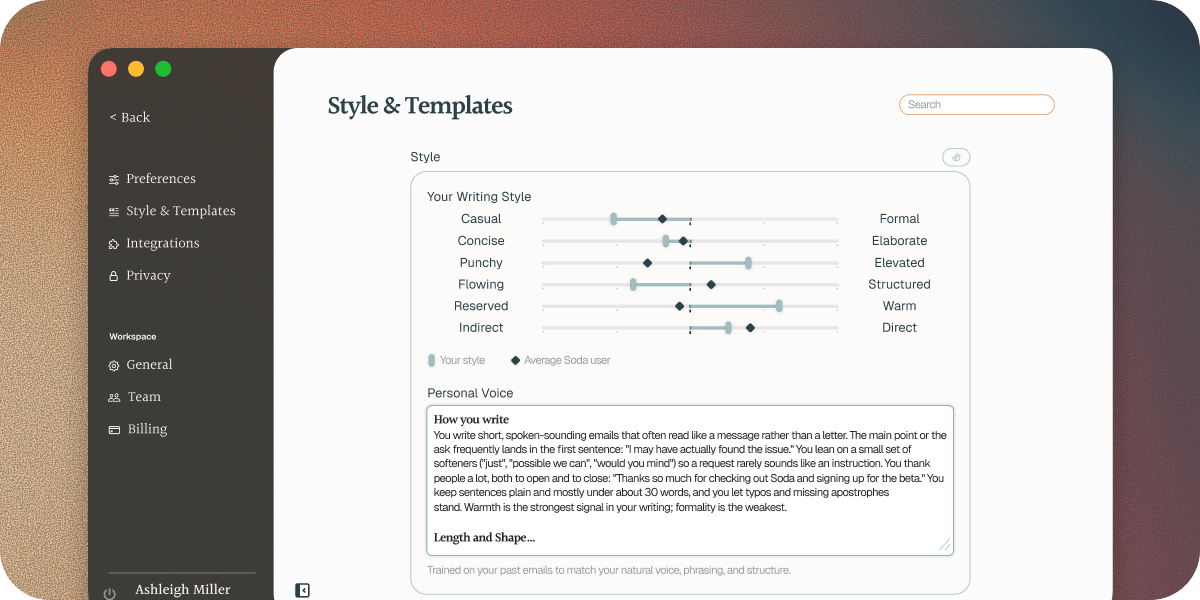
Want to see what Soda has learned? Go to **Settings** > **Style & Templates**. **Your Writing Style** sits under **Style**, tucked away until you want it. Click the chart icon at the right of **Style** to open it.
At the top, one line sums up your voice. Below it, Soda scores your writing on six dimensions of style:
* **Casual** to **Formal**
* **Concise** to **Elaborate**
* **Plain** to **Elevated**
* **Flowing** to **Structured**
* **Reserved** to **Warm**
* **Indirect** to **Direct**
**Your style** marks where you sit on each one. **Average** allows you to compare how you write to other Soda users. Under each bar, a line explains what your score means.
## See your writing style
Want to see what Soda has learned? Go to **Settings** > **Style & Templates**. **Your Writing Style** sits under **Style**, tucked away until you want it. Click the chart icon at the right of **Style** to open it.
At the top, one line sums up your voice. Below it, Soda scores your writing on six dimensions of style:
* **Casual** to **Formal**
* **Concise** to **Elaborate**
* **Plain** to **Elevated**
* **Flowing** to **Structured**
* **Reserved** to **Warm**
* **Indirect** to **Direct**
**Your style** marks where you sit on each one. **Average** allows you to compare how you write to other Soda users. Under each bar, a line explains what your score means.
 ## Editing your Voice Profile
If you want to edit your voice profile, type in plain words. For example:
* "Never use exclamation marks."
* "I always sign off with 'Speak soon'."
* "Keep it to one short paragraph, plus a list if there are next steps."
Your changes save as you type, and your next draft follows them. Want Soda's version back? Click **Restore original**.
## Rebuild your Voice Profile
Your Voice Profile stays as it is until you ask for a new one. Rebuild it when your writing has changed, like at a new job.
Go to **Settings** > **Style & Templates**.
Click the rebuild icon at the top right of the **Style** card. Its tooltip reads **Rebuild writing style**.
Click **Rebuild**.
Soda relearns from the emails you've sent recently, then updates your chart and **Personal Voice**.
Rebuilding replaces your **Personal Voice**, including any edits you've made, and it can't be undone. Copy anything you want to keep before you rebuild, then add it back afterwards.
## Troubleshooting
Tell Soda what's off in **Personal Voice**, in your own words. Your next draft follows it. If your writing has changed since Soda built your Voice Profile, [rebuild it](#rebuild-your-voice-profile).
Soda needs at least 20 sent emails to learn your style. **Settings** > **Style & Templates** shows what went wrong:
* "Not enough sent email yet to learn your style." Send a few more emails, then click **Start analysis** to try again.
* "Soda couldn't build your writing style." Click **Start analysis** to try again.
* "Rebuild failed" or "Soda couldn't rebuild your writing style." Your previous Voice Profile keeps working. Click **Retry**.
If it keeps failing, [contact support](/docs/troubleshooting/contact-support).
## Next steps
Styles, templates, and what goes in every draft.
What Soda reads and keeps, and what it never does.
This documentation is built and hosted on [Mintlify](https://mintlify.com), a developer documentation platform.
## Editing your Voice Profile
If you want to edit your voice profile, type in plain words. For example:
* "Never use exclamation marks."
* "I always sign off with 'Speak soon'."
* "Keep it to one short paragraph, plus a list if there are next steps."
Your changes save as you type, and your next draft follows them. Want Soda's version back? Click **Restore original**.
## Rebuild your Voice Profile
Your Voice Profile stays as it is until you ask for a new one. Rebuild it when your writing has changed, like at a new job.
Go to **Settings** > **Style & Templates**.
Click the rebuild icon at the top right of the **Style** card. Its tooltip reads **Rebuild writing style**.
Click **Rebuild**.
Soda relearns from the emails you've sent recently, then updates your chart and **Personal Voice**.
Rebuilding replaces your **Personal Voice**, including any edits you've made, and it can't be undone. Copy anything you want to keep before you rebuild, then add it back afterwards.
## Troubleshooting
Tell Soda what's off in **Personal Voice**, in your own words. Your next draft follows it. If your writing has changed since Soda built your Voice Profile, [rebuild it](#rebuild-your-voice-profile).
Soda needs at least 20 sent emails to learn your style. **Settings** > **Style & Templates** shows what went wrong:
* "Not enough sent email yet to learn your style." Send a few more emails, then click **Start analysis** to try again.
* "Soda couldn't build your writing style." Click **Start analysis** to try again.
* "Rebuild failed" or "Soda couldn't rebuild your writing style." Your previous Voice Profile keeps working. Click **Retry**.
If it keeps failing, [contact support](/docs/troubleshooting/contact-support).
## Next steps
Styles, templates, and what goes in every draft.
What Soda reads and keeps, and what it never does.
This documentation is built and hosted on [Mintlify](https://mintlify.com), a developer documentation platform.