Context Aware Recommendations

Introducing Recommendations

Context Aware Recommendations

Introducing Recommendations

TL;DR

Every conversation, every call, and every decision made adds to Soda’s knowledge layer.

The richer that layer gets, the more important it is that the right context finds you at the right moment. That's what this update is about. We're changing how Soda surfaces what it knows, so the context you need is already waiting when you go looking.

Recommended Contacts

We added a section to the menu bar called Recommended. It sits above the recent contacts list and surfaces the people you're most likely to want right now.

If you've got a meeting starting soon, they appear at the top when you open the app. The label shows when the call starts. One click and you're in their profile. Or if you’re browsing someone's LinkedIn profile. Soda recognises the contact, matches to what it already knows, and surfaces their profile in the new recommended section. 

These friction points come up more than you'd think. It’s 5 minutes before your next customer call and you need a quick recap of the last conversation, or you're checking out a prospect on LinkedIn and need to know what your BDR spoke to them about last week. It's in these micro-moments that we found people don’t want to go digging through their inbox or trawling through the CRM. So now Soda brings it to you, right on the desktop and only a click away.
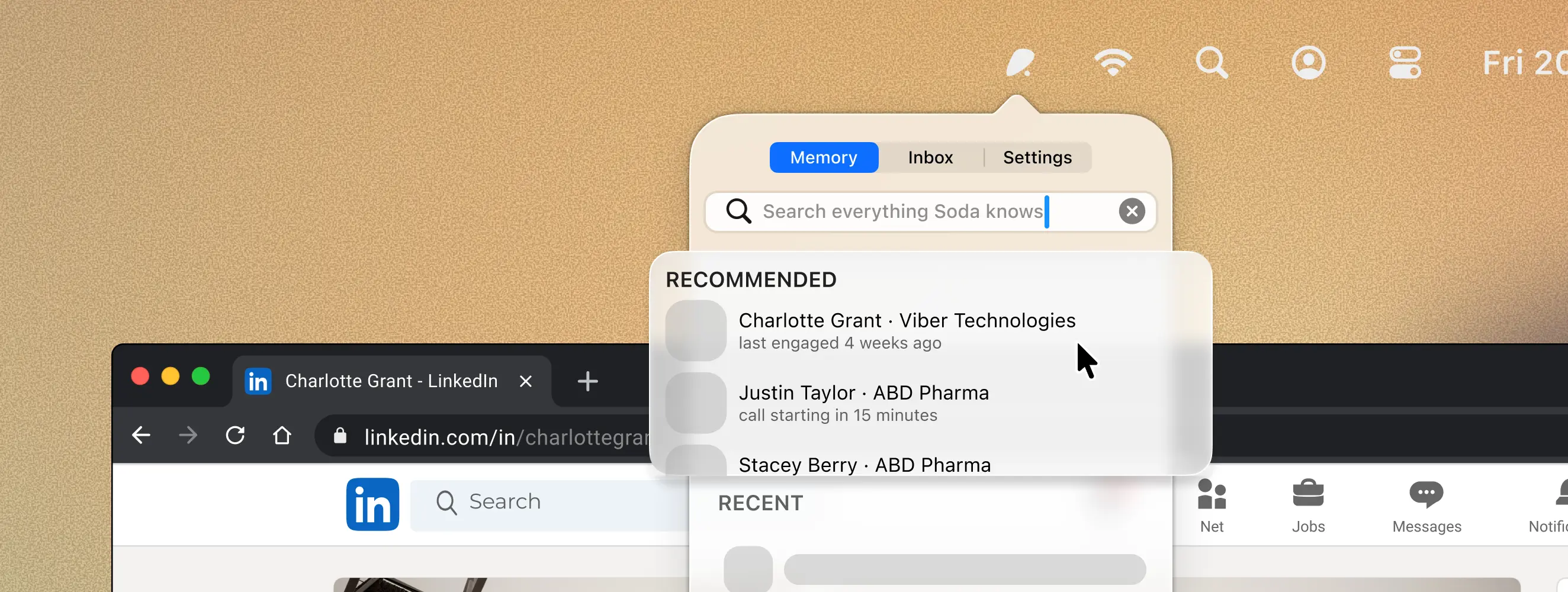

Soda now provides Context Aware recommendations, bringing important knowledge and memory to you


What we've seen so far

The main thing is that people just walk into more conversations with context. They didn't build a new habit or set a reminder. They opened Soda and the right person was already there. One user told us they started prepping for a call they'd forgotten was even on their calendar, purely because the contact appeared in Recommended when they opened the popover for something else.

The part we're most interested in over time is how it compounds. A contact card from a conversation six weeks ago doesn't do anything if you never go looking for it. When your calendar tells Soda you're about to speak to that person again, the context from that earlier conversation becomes useful again. The more contacts Soda knows, the more often the recommended section has something worth reading before a call starts.


Why this matters beyond prep

A lot of tools capture things. Recordings exist. Transcripts are searchable. The information is in there somewhere. But knowledge you have to go looking for is knowledge that mostly stays buried.

We built Soda to remember what you do, a living knowledge layer. Recommended is about making sure what Soda remembers is already in front of you when it matters. We don’t want to build yet another solution that demands your time and attention, we want Soda to be truly helpful.

How does Soda know who I'm about to meet?

Soda connects to your calendar. Apple Calendar and Google Calendar are both currently supported with Outlook coming soon. If someone on an upcoming meeting is already a known contact in Soda, they appear in the Recommended section when you open the app. The default look-ahead window is 30 minutes before a meeting starts.

How does Soda know who I'm about to meet?

Soda connects to your calendar. Apple Calendar and Google Calendar are both currently supported with Outlook coming soon. If someone on an upcoming meeting is already a known contact in Soda, they appear in the Recommended section when you open the app. The default look-ahead window is 30 minutes before a meeting starts.

Does Soda work with LinkedIn?

Yes. When you're browsing someone's LinkedIn profile, Soda recognises the URL and matches it to a known contact. Their profile appears in the Recommended section the next time you open Soda from the menu bar. You'll need the Chrome extension installed for this to work.

Does Soda work with LinkedIn?

Yes. When you're browsing someone's LinkedIn profile, Soda recognises the URL and matches it to a known contact. Their profile appears in the Recommended section the next time you open Soda from the menu bar. You'll need the Chrome extension installed for this to work.

What if someone on my calendar isn't in Soda yet?

Soda only surfaces people it already knows from previous conversations or interactions. It won't create a contact just because someone appears on a calendar invite. But after the call, after it has context on who this new person is, the profile will be created for future use.

What if someone on my calendar isn't in Soda yet?

Soda only surfaces people it already knows from previous conversations or interactions. It won't create a contact just because someone appears on a calendar invite. But after the call, after it has context on who this new person is, the profile will be created for future use.

Can I see what my colleagues have discussed with a recommended contact?

Yes. When you open a contact's profile through the Recommended section, you see the full picture. That includes conversations your teammates have captured, not just your own.

Can I see what my colleagues have discussed with a recommended contact?

Yes. When you open a contact's profile through the Recommended section, you see the full picture. That includes conversations your teammates have captured, not just your own.

What happens with back-to-back meetings?

Contacts stack in order based on when each meeting starts. As one call ends and the next approaches, the list updates on its own. Contacts stay visible for five minutes after a meeting ends so you can check details or log something while it's fresh.

What happens with back-to-back meetings?

Contacts stack in order based on when each meeting starts. As one call ends and the next approaches, the list updates on its own. Contacts stay visible for five minutes after a meeting ends so you can check details or log something while it's fresh.