


It works in the background
We didn’t want to build yet another tool that asks you to take time out of your busy day to keep it updated. So Soda gets on with things by itself. You don’t press record, open anything, or fill anything in. When a call starts, Soda is already paying attention. When an email thread moves on, it’s already caught up. Learn more about Soda’s philosophy. It’s designed to feel like part of your Mac. It’s there when you want it, and out of the way when you don’t.How Soda works
Soda uses your existing conversations with each customer, on calls and over email, and treats them as one. It knows who’s speaking, so action items land on the right person. It follows the whole conversation, including everything that happens after the meeting, so it picks up the nuance that one call or one message would miss. That’s how Soda gets to know people. It learns what each person cares about, how they see things, and where they stand, along with what was agreed and what happens next. All of it goes onto a living profile for each person and company. When something changes, like a new job title or a new stakeholder, the profile changes with it. See how Soda keeps a profile up to date. The more you work with someone, the more Soda knows about them. Every customer profile stays up to date, whether it’s built on one conversation or hundreds. It keeps getting more useful as your relationships grow.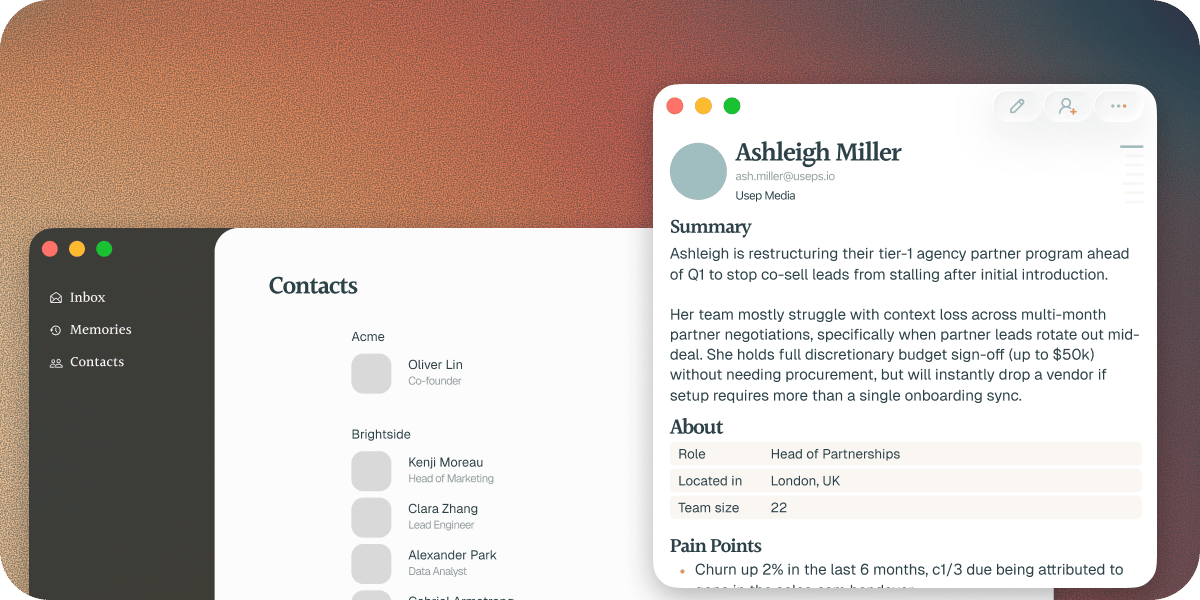
What you get
- Every contact and company gets a living profile, with everything Soda has learned in one place. Click any detail to see where it came from.
- Tap ⌘ twice (⌘⌘) from anywhere and ask about anyone you’ve spoken to or emailed.
- Share a contact, a company, or a single conversation with a colleague, so whoever picks up the account starts with the full history.
- Soda writes up every meeting with a summary, decisions, key moments, and action items, without you taking a note.
- After a meeting, Soda drafts the follow-up email in your own writing style.

What Soda never does
No bot joins your meetings, and nobody else on the call can see Soda. Your call audio is transcribed on your Mac and then discarded. It’s never uploaded, and no recordings are kept. Soda never sends an email for you. Follow-ups wait in your drafts until you approve them. What Soda learns is private to you until you choose to share it. You decide what your team sees. The full detail is in What Soda captures, and what it never does.What you need
Soda runs on a Mac with macOS Sonoma 14.6 or later. You sign in with your work email on Google or Microsoft, because Soda is built for teams. Signing in brings your calendar with it, and connecting Gmail or Outlook lets Soda follow your conversations the whole way through. Soda also needs a few macOS permissions so it can hear your calls and tell who’s speaking. See Grant Soda the permissions it needs.Next steps
Install Soda and sign in
Get Soda on your Mac and sign in with your work email.
Set up Soda for your team
For admins bringing a whole team onto Soda.