


What happens when something changes
Let’s say you jump on a call with someone who mentions they’ve moved role, Soda picks up two changes: a new employer and a new job title and rewrites the line to match. The old details don’t disappear. The old role and company move into their history, each with dates of when it was true. A year from now, anyone who opens the profile can still see where they used to work, and when that changed. That’s useful when their old company comes up for renewal and someone asks who used to own the relationship there.Some details build a list
A job title has one current value. So does an employer. When a new one arrives, it takes over. Other details add up. Concerns, interests, decisions, and connections build and compound over time. When a customer raises a new worry, it joins the ones they’ve mentioned before. Each new decision sits alongside the ones before it. Each person they mention joins their connections. So a profile gets fuller the more your team talks to someone, without losing what came before.See what changed
Soda marks what’s new, so you don’t have to reread a whole profile to find it. You’ll spot it in two ways.Highlighted lines
Anything Soda has changed in the last two weeks is highlighted in colour. Hover over a highlighted line to see when it changed and which call or email it came from. After two weeks the colour fades to plain text.New since your last visit
The +N new badge counts the details Soda has learned since you last opened the profile, going back up to two weeks. Click it to open What’s new, which lists each new detail and who it came from. Anything you added yourself is left out of the count, so it only shows what’s news to you.Check the history
Wondering why a profile says what it says? Right-click any detail. You’ll see where it came from, with the exact words, the date, and a link to open that call or email. Below that is the detail’s history: every earlier value, each with its own date and the words behind it. Right-click the job title in the example above, and you’ll see the old role listed under the new one.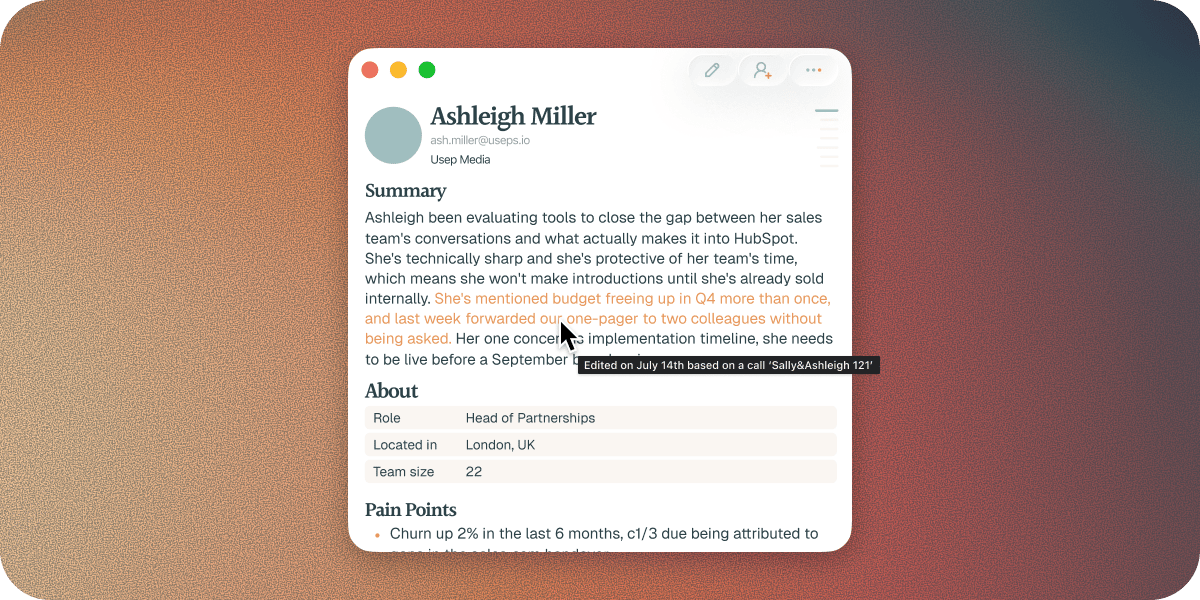
Shared profiles update for everyone
When someone shares a profile with you using Live Share, you’re both working from one profile. Whatever either of you learns lands on it, and shows up for both of you in near real time, highlights included. That’s how you knew about the job change the morning after your colleague’s call, without them having to tell you. Sales and customer success work from the same version of the truth. If two people pick up different values for the same detail, the latest one wins, so everyone sees the same answer.If you don’t want to work off one shared memory try Send Copy which gives your teammate their own snapshot. See how to share with a teammate.
Your edits win
You know your customers better than anyone. If a detail is wrong, or out of date in a way Soda couldn’t know, change it, and your version stays. A later call or email that says something different won’t change it back. The same goes for an earlier value you bring back from a detail’s history. See how to correct a detail.What Soda leaves alone
Soda only changes a profile when it hears or reads something new. It doesn’t guess. If a detail still looks wrong, you can check where it came from and put it right. See when Soda gets it wrong.Next steps
When Soda gets it wrong
Check a detail, fix it, and stop it happening again.
Sharing
Give your team one profile that stays current for all of you.